
Drawing Call Graphs#
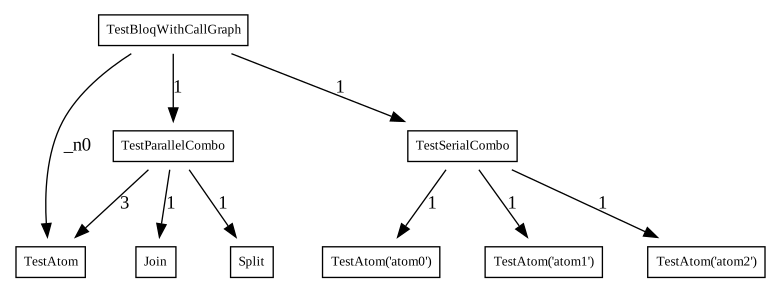
The “call graph” is a graph that encodes how bloqs “call” other bloqs as part of their decomposition. We can visualize the call graph of a bloq using the convenience method qualtran.drawing.show_call_graph.
from qualtran.bloqs.for_testing.with_call_graph import TestBloqWithCallGraph
from qualtran.drawing import show_call_graph

bloq = TestBloqWithCallGraph()
call_graph, _ = bloq.call_graph()
show_call_graph(call_graph)
GraphvizCallGraph#
Under the hood, the above function uses the GraphvizCallGraph class, which describes how to format the display of each bloq and interfaces with Graphviz through pydot.
from qualtran.drawing import GraphvizCallGraph

drawer = GraphvizCallGraph(call_graph)

# Additional methods are provided like `get_svg_bytes` which can
# be written to a file to save the diagram.
print(drawer.get_svg_bytes()[:400], '...')
b'<?xml version="1.0" encoding="UTF-8" standalone="no"?>\n<!DOCTYPE svg PUBLIC "-//W3C//DTD SVG 1.1//EN"\n "http://www.w3.org/Graphics/SVG/1.1/DTD/svg11.dtd">\n<!-- Generated by graphviz version 2.42.4 (0)\n -->\n<!-- Title: counts Pages: 1 -->\n<svg width="586pt" height="218pt"\n viewBox="0.00 0.00 586.00 218.00" xmlns="http://www.w3.org/2000/svg" xmlns:xlink="http://www.w3.org/1999/xlink">\n<g id="graph0"' ...
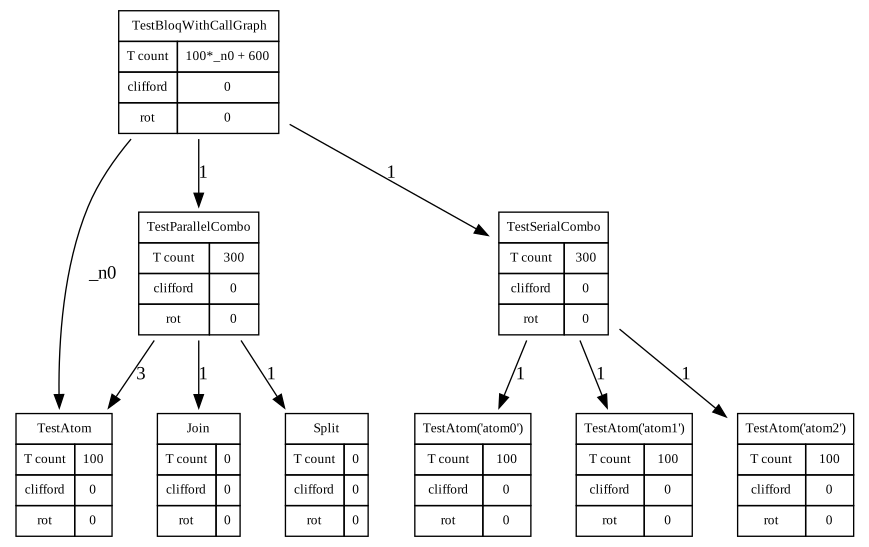
For example, you can annotate each bloq with its t complexity
# Collect T-Complexity data
bloq_data = {}
for bloq in call_graph.nodes:
    tcomp = bloq.t_complexity()
    record = {
        'T count': tcomp.t,
        'clifford': tcomp.clifford,
        'rot': tcomp.rotations,
    }
    bloq_data[bloq] = record

# Draw the call graph with the additional data
GraphvizCallGraph(call_graph, bloq_data=bloq_data).get_svg()
The abstract base class _CallGraphDrawerBase is provided with overridable methods if you need additional customization of how bloqs are displayed in the call graph.